Der Shop ist online

Wir bauen Workstation AI-Maschinen für Websites, KI-Agenten und LLM-Training – online konfigurieren und kaufen.

Händlerpreise erhalten
KI-Produkte
KI-LabsOpenAI-AgentenClaude-AgentenGrok-BotWorkstation AI-natives CRMMarketingAlle Produkte
KI-Lösungen
Angewandte KIKI-AgentenGenerative KIKI-AutomatisierungKI-WeiterbildungKI-Pakete für KMUEnterprise AI LabKI-WorkstationsNVIDIA-Hardware & -SoftwareNVIDIA Accelerated ComputingPrivate KIGPU-Private-CloudGPU-ClusterEdge-KIKI nach Branche
KI-Services
PlattformmodernisierungDigital EngineeringDatengrundlagen & KIAutonomer BetriebKI-BeratungDevOps-AutomatisierungCybersicherheitSoftwareentwicklungAgentenentwicklungMLOps-EinrichtungGPU-LeasingGPU-Private-Cloud
Über uns
UnternehmenUnsere GeschichtePartnerKundengeschichten
KI-Rechenzentren
KI-RechenzentrenGPU-Private-CloudGPU-ClusterGPU-Leasing
KI-EinblickeJev-ReiheBenchmark LabModellauswahl
Technische Hinweise
Dokumentation
Linux-BetriebssystemeUbuntuRed Hat Enterprise LinuxSUSE LinuxAlpine LinuxDebian, Rocky & AlmaLinux
KI-Cloud-PlattformenAWS & Amazon BedrockGoogle Cloud & Vertex AIMicrosoft Azure & AI FoundryGPU-Clouds & Marktplätze
Private KI-RechenzentrenFür AnwaltskanzleienFür Steuer- und WirtschaftsprüfungskanzleienOn-Premises-PlattformenVollständig abgesicherte Cloud
ToolsRing PromoterJobshout
News
Blog
KontaktAnmelden

KI-Workstations, Multi-Agenten-KI-Software, GPU-Infrastruktur und intelligente Agentenlösungen für moderne Unternehmen.

Kontakt

KI-Lösungen

Angewandte KIKI-AgentenGenerative KIKI-AutomatisierungKI-WeiterbildungKI-Pakete für KMUEnterprise AI LabKI nach Branche

Produkte

Alle ProdukteWorkstation AI-natives CRM & ERPMarketingOpenAI-AgentenRing PromoterJobshout

Unternehmen

Über unsUnternehmenKI-RechenzentrenWarum WorkstationPartnerKundengeschichtenPreiseKontaktTenthMatrix

Ressourcen

KI-EinblickeTechnische HinweiseDokumentationLinux-BetriebssystemeKI-Cloud-PlattformenPrivate KI-RechenzentrenBlogSucheSitemap
Büro Belgien
Workstation SRL, Rue Vanderkindere 34, 1180 Uccle, BrusselsBE 0751.518.683Mo – Fr: 9:00 – 18:00 Uhr MEZ
+32 492 45 67 46
Hauptsitz Großbritannien
77-79 Marlowes, Hemel Hempstead HP1 1LFAnfahrt – Ausfahrt 20 der M25 (Outer London)Handelsregisternr.: 11641870Mo – Fr: 9:00 – 18:00 Uhr GMT
+44 7515 356 146
Büro Indien
#159 Sector 9, Pocket 1, DDA Flats, 110077 Dwarka, New Delhi
+91 98881 98841
Büro Taiwan
3F, No. 2-4, Aisi Rd., Ren'ai Dist., Keelung City 200, Taiwan基隆市仁愛區愛四路2之4號3樓Mo – Fr: 9:00 – 18:00 Uhr Taiwan-Zeit (GMT+8)
+886 926 892 701+32 492 45 67 46
Büro Estland
Aleksander Puškini tn 30-25, 20306 Narva, EstoniaMo - Fr: 9:00 - 18:00 Uhr estnischer Zeit (EET)
+32 492 45 67 46

© 2026 Workstation AI. Alle Rechte vorbehalten.

DatenschutzDatenlöschungCookiesNutzungsbedingungenWebsite-Sitemap

NVIDIA, das NVIDIA-Logo, RTX, RTX PRO, Blackwell, CUDA, NVLink, MGX, Omniverse, Spectrum-X, Quantum, BlueField, DGX und HGX sind Marken und/oder eingetragene Marken der NVIDIA Corporation in den USA und anderen Ländern. AMD, das AMD-Arrow-Logo, EPYC, Instinct, Ryzen und Threadripper sind Marken von Advanced Micro Devices, Inc. Dell und PowerEdge sind Marken der Dell Inc. oder ihrer Tochtergesellschaften. Intel und Xeon sind Marken der Intel Corporation oder ihrer Tochtergesellschaften. AMAX, AceleMax und LiquidMax sind Marken der AMAX Engineering Corporation. Alle anderen Produktnamen, Logos und Marken sind Eigentum ihrer jeweiligen Inhaber. Wir verwenden sie ausschließlich, um die Produkte zu kennzeichnen, die wir beschreiben, liefern oder unterstützen; ihre Verwendung bedeutet nicht, dass ihre Inhaber uns empfehlen.

Loading blog...

Startseite / Blogs
Claude CodeAnthropicAI AgentsAutomationDevOpsAI

Claude Code Routines: Scheduled Cloud Agents, Sub-Routines and Co-Routines

Run Claude Code on a schedule, from an API call or on GitHub events, with no laptop and no server. The five-minute guide.

Balinder Walia25. September 20263 min read
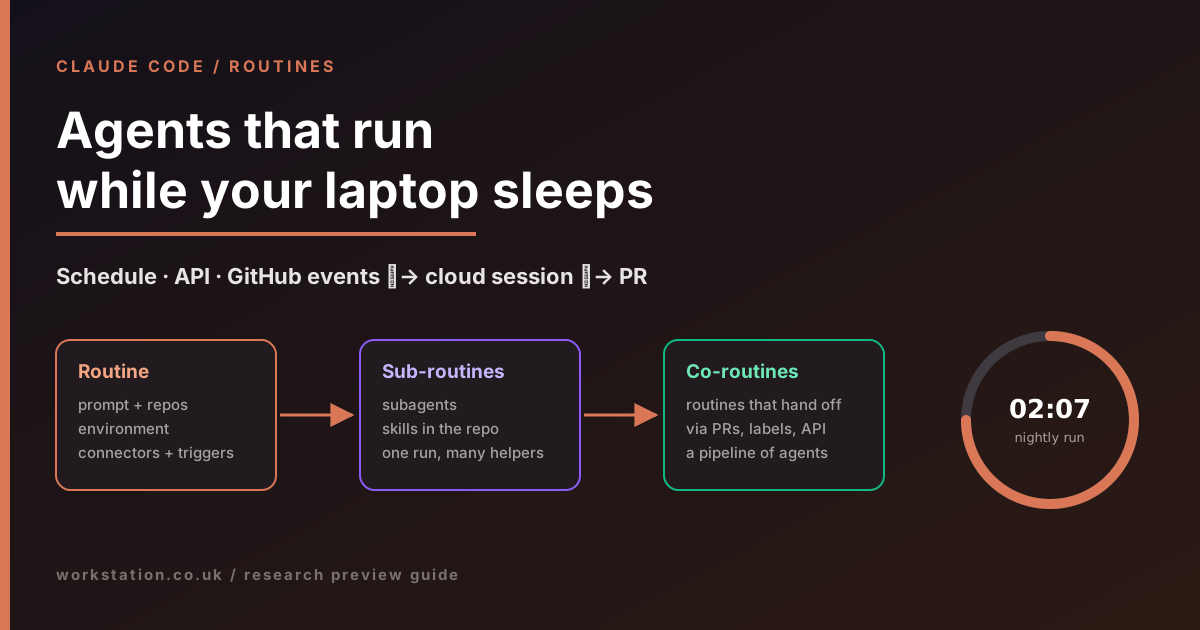
Claude Code Routines: scheduled cloud agents, sub-routines and co-routines

Claude Code no longer needs you at the keyboard. Routines run saved agent tasks on Anthropic's cloud on a schedule, from an API call or when something happens on GitHub. Here is what they are, how to set one up, and two patterns we call sub-routines and co-routines. For the full guide, read the long article.

Claude Code Routines: scheduled cloud agents, sub-routines and co-routines

Bottom line. A routine is a Claude Code task you configure once (prompt, repositories, cloud environment, connectors) and trigger automatically. It runs as a full autonomous session in the cloud, so your laptop can stay closed. Routines are in research preview (since 14 April 2026) on the Pro, Max, Team and Enterprise plans.

Three ways to start a routine

  • Schedule: hourly, daily, weekdays, weekly or a one-off time, entered in your local time zone. Custom cron is available via /schedule update, with a minimum interval of one hour.
  • API: a per-routine HTTPS endpoint with its own bearer token. Your alerting tool or deployment pipeline POSTs to it, optionally with context text. That text arrives labelled as untrusted, so a leaked token cannot rewrite the routine's instructions.
  • GitHub: pull request or release events, filtered by branch, label, author, draft or merged state.
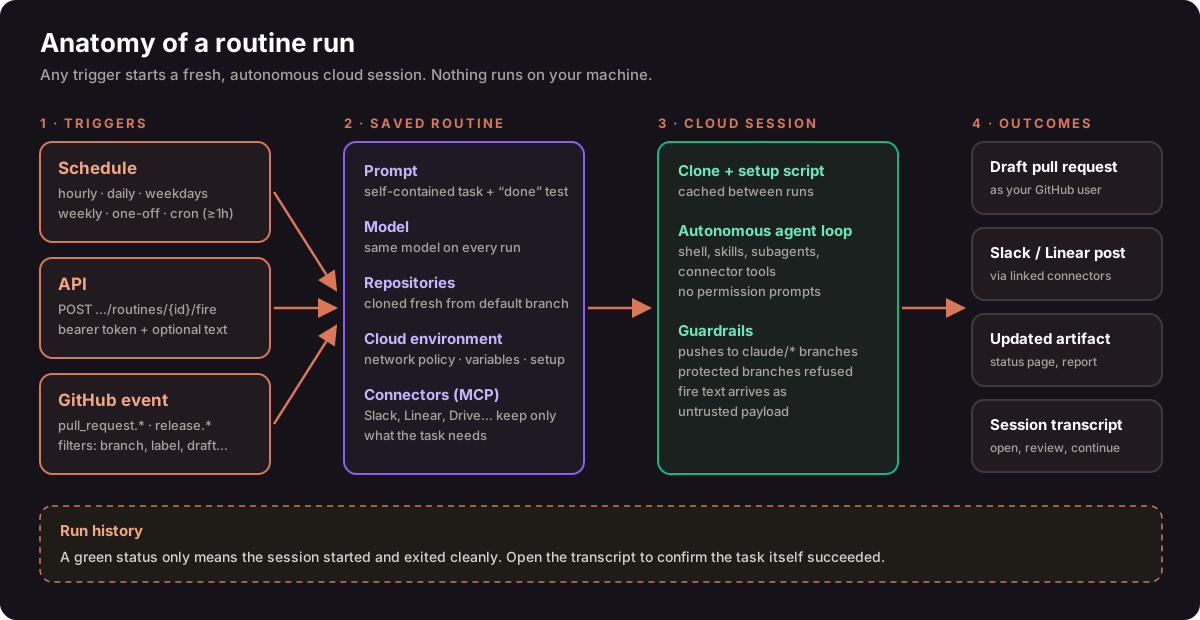
Anatomy of a routine run: triggers, saved routine, cloud session and outcomes

Set one up in two minutes

  1. Open claude.ai/code/routines and choose New routine, or type /schedule in the Claude Code CLI.
  2. Write a self-contained prompt: scope, allowed actions, output destination and what to do when there is nothing to do.
  3. Pick repositories and an environment. Remove connectors the task does not need, because all of them are included by default.
  4. Add a trigger, choose Run now to test, then read the transcript. A green badge only means the session ran, not that the task succeeded.

Sub-routines: one run, many helpers

This is our name for a pattern, not an Anthropic feature. The routine's prompt orchestrates, and it hands each step to a subagent (.claude/agents/) or a skill committed to the repository. Each helper gets its own context window and only the tools it needs, which keeps long unattended runs focused, cheaper and safer.
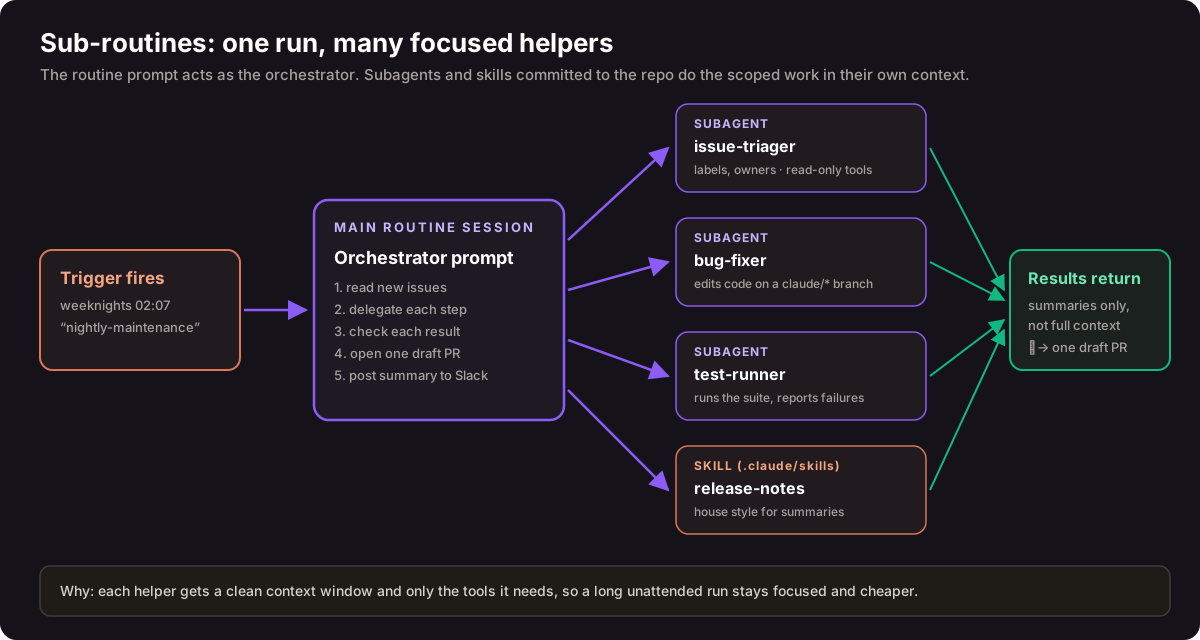
Sub-routines: an orchestrator prompt delegating to subagents and skills

Co-routines: routines that hand off work

Routines cannot call each other directly, but they can cooperate through durable artefacts. For example, a nightly routine opens a draft PR, a GitHub-triggered routine reviews it, a human merges it, a merge-triggered routine updates the docs, and your deployment pipeline calls a verification routine. Use filters so no routine fires on its own output, and keep a human merge gate in the chain.
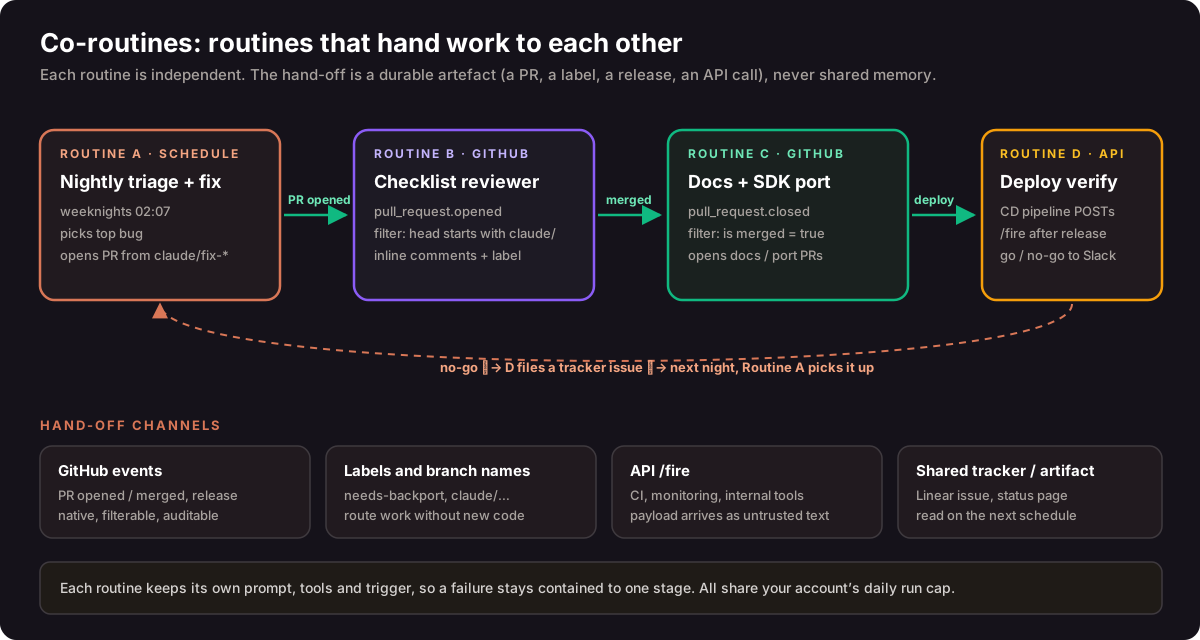
Co-routines: four routines cooperating through GitHub events, labels and API calls

Limits worth knowing

  • Daily run caps at launch were 5 on Pro, 15 on Max and 25 on Team and Enterprise, on top of normal subscription usage. One-off runs do not count.
  • Routines act as you. Commits, PRs and Slack messages carry your identity. Claude pushes only to claude/ branches unless told otherwise, and never to protected ones.
  • Need minute-level polling or local files? Use /loop or Desktop scheduled tasks instead.

Read next: the complete guide covers API payload security, prompt templates, subagent examples, comparisons with GitHub Actions, n8n and Trigger.dev, and a governance checklist. Sources: Anthropic announcement · Claude Code docs.