This Workstation technical brief covers agentic AI security and authentication: securing enterprise agents that call tools through MCP (Model Context Protocol) with OAuth 2.1, placing high-risk MCP endpoints behind VPN / private networking, and managing tool credentials with HashiCorp Vault — dynamic secrets, leases, auto-rotation, and immediate revoke. It recommends industry-aligned setups for Claude, OpenAI, and Cursor.
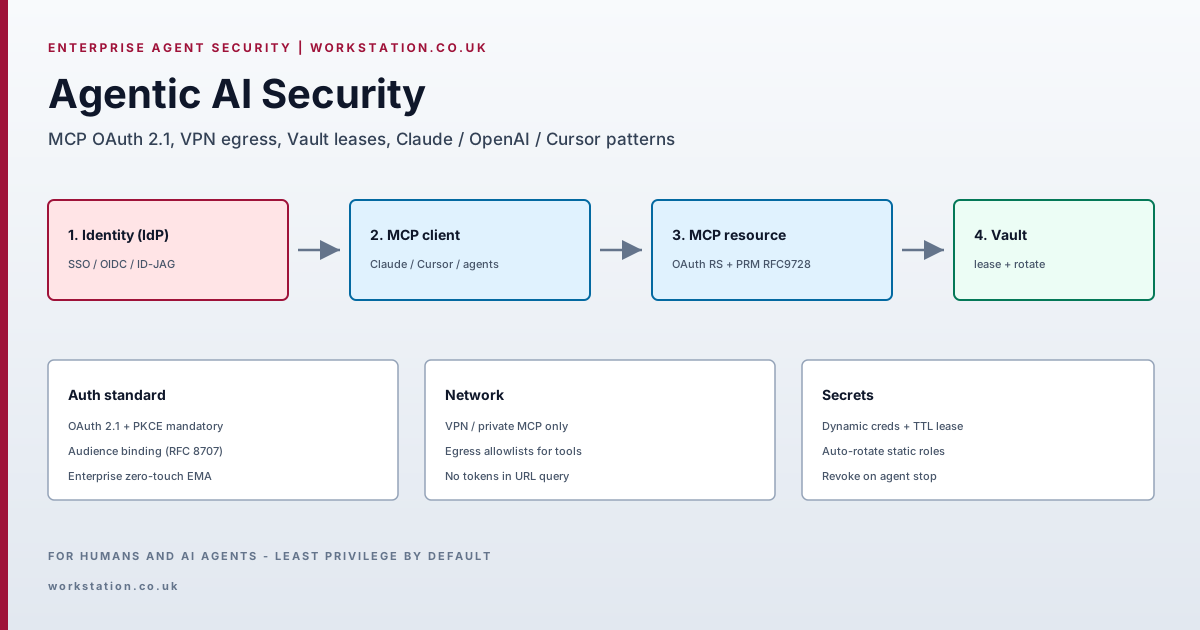
- Problem: Agents with static long-lived tool keys + public MCP = credential sprawl and lateral movement.
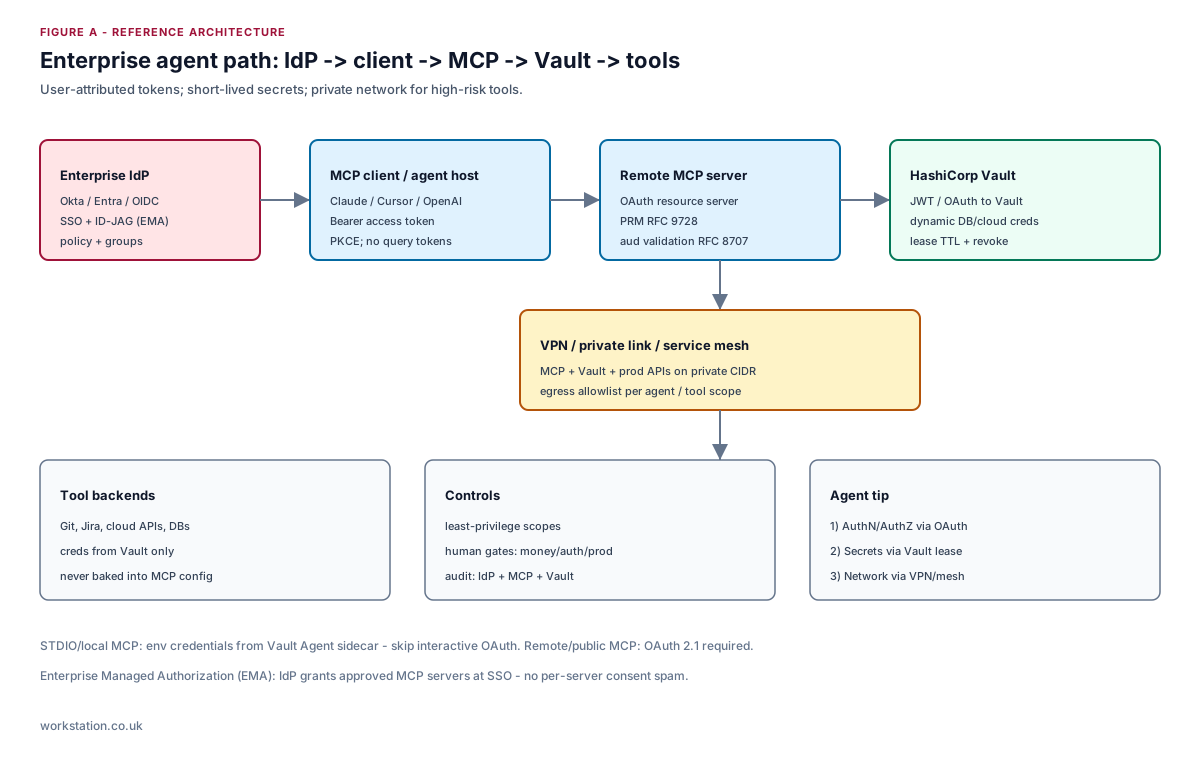
- Auth: Remote MCP = OAuth 2.1 resource server + RFC 9728 PRM + RFC 8707 audience; PKCE mandatory.
- Enterprise: Prefer MCP Enterprise-Managed Authorization (EMA / ID-JAG) via corporate IdP.
- Network: Internal MCP and Vault on VPN/private link; egress allowlists per tool.
- Secrets: Vault dynamic secrets + lease TTL; auto-rotate static roles; revoke on session end.
- Split: LLM provider API keys != MCP access tokens != backend tool secrets.
Sources: MCP Authorization, Vault leases, Vault AI agent validated pattern, Claude connector auth. Verify current vendor docs before production rollout.
1. Threat model for enterprise agents
An agent is a privileged automation principal. Typical failure modes:
- Secret sprawl — API keys in MCP JSON,
.envcommitted to git, or pasted into prompts. - Token substitution — access token minted for server A accepted by server B (missing audience binding).
- Over-scoped tools — one MCP can write prod DBs and open firewalls with the same session.
- Unaudited OBO — agent acts without linking actions to a human identity.
- Public MCP — internal tools reachable from the internet without VPN or private link.
Controls must cover identity (who), authorization (what tools), secrets (with what credentials), and network (from where).
2. MCP authentication: industry standard
For HTTP-based remote MCP, the specification aligns with OAuth 2.1:
- MCP server = OAuth resource server; clients send
Authorization: Bearer. - PKCE is mandatory; implicit grant is prohibited.
- Servers MUST publish Protected Resource Metadata (RFC 9728) so clients discover the authorization server.
- Use Resource Indicators (RFC 8707) so tokens are audience-bound to that MCP server.
- Authorization Server Metadata (RFC 8414) and/or OIDC discovery for AS capabilities.
- Dynamic Client Registration (RFC 7591) is recommended where clients must onboard without manual client IDs.
# Protected Resource Metadata (conceptual)
{
  "resource": "https://mcp.internal.example/mcp",
  "authorization_servers": ["https://auth.example.com"],
  "scopes_supported": ["mcp:tools", "mcp:resources"]
}
STDIO / local MCP is different: prefer environment credentials injected by Vault Agent — do not force browser OAuth on every desktop tool. Remote/public MCP should implement OAuth 2.1.
2.1 Enterprise-Managed Authorization (zero-touch)
The MCP Enterprise-Managed Authorization extension lets the corporate IdP (Okta, Entra ID, etc.) grant access to approved MCP servers at SSO using an ID-JAG (Identity Assertion JWT Authorization Grant), avoiding per-server consent fatigue. Adopt EMA for org-wide Claude / IDE / agent fleets.
3. VPN and private MCP integration
OAuth authenticates the client; it does not replace network isolation.
- Host internal MCP servers and Vault on private CIDR (VPN, PrivateLink, Tailscale/WireGuard mesh, or service mesh mTLS).
- Bind MCP listeners to private interfaces; block public 443 unless the product is intentionally internet-facing.
- Apply egress allowlists from the agent runtime: only approved APIs/MCP hosts.
- Split planes: developer laptops on corp VPN for Cursor; server-side agents in VPC with no internet MCP except approved SaaS.
Pattern: VPN for reachability + OAuth for authorization + Vault for secrets.
4. HashiCorp Vault for agent secrets
Static long-lived tool keys are incompatible with agent blast radius. Vault provides:
4.1 Dynamic secrets + leases
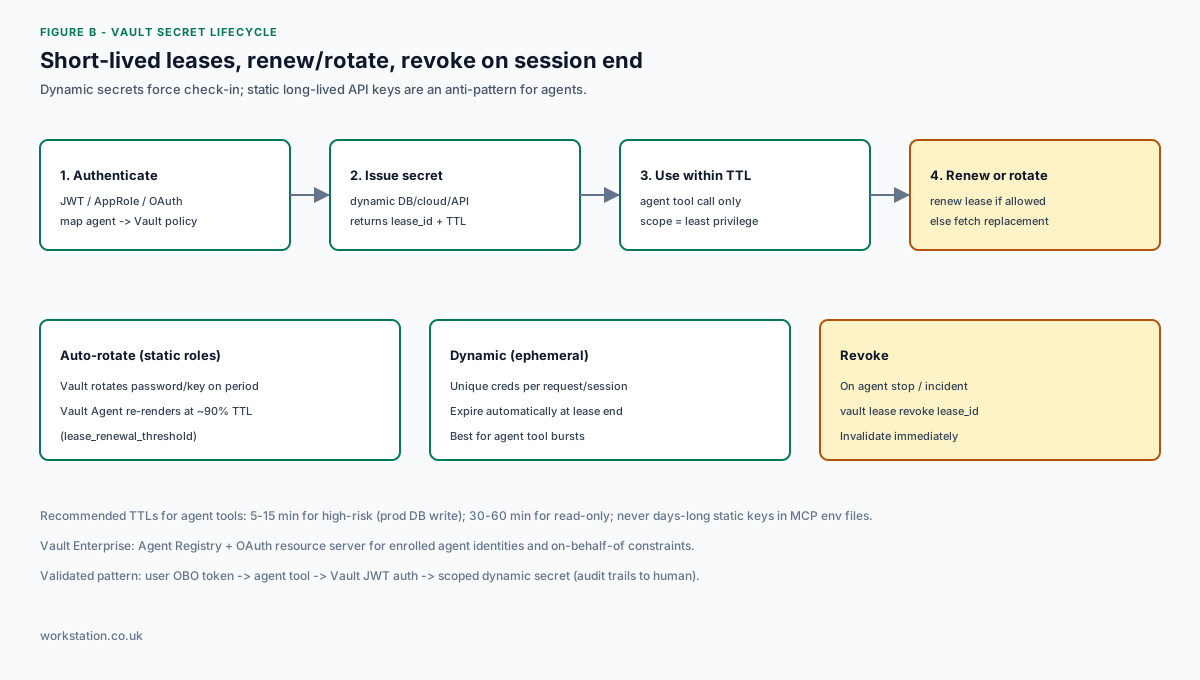
Every dynamic secret returns a lease_id and TTL. The consumer must renew (if allowed) or request a replacement before expiry. When the lease ends, Vault can revoke the credential at the provider. This forces check-in, improves audit logs, and shrinks exposure windows.
4.2 Auto-rotation
For static roles (e.g. database password with rotation_period), Vault rotates on a schedule. Vault Agent templates re-fetch near end of life (default lease_renewal_threshold ~0.9 of TTL) and can restart a child process when credentials change.
4.3 Recommended TTLs for agents
| Risk class | Example | TTL guidance |
|---|---|---|
| Critical write | Prod DB mutate, IAM admin | 5-15 minutes; revoke on tool end |
| Read / staging | Read replicas, ticket APIs | 30-60 minutes |
| LLM provider key | OpenAI / Anthropic org key | Vault-managed; rotate on schedule; never in MCP JSON |
4.4 Vault + user attribution (validated pattern)
HashiCorp’s validated pattern: user authenticates; agent receives an on-behalf-of (OBO) token; tools authenticate to Vault with JWT; Vault maps claims to policies and issues scoped dynamic secrets. Audit trails link secret issuance to the human, not a shared robot account.
Vault Enterprise adds Agent Registry and OAuth resource server profiles so enrolled agents present OAuth JWTs without a separate Vault login step — with agent-specific constraints for delegation / OBO.
# Conceptual agent tool hook (do not ship secrets to the model)
vault_token = login_jwt(obo_token)           # Vault auth
secret = vault.read("database/creds/agent-ro")
lease_id, ttl = secret["lease_id"], secret["lease_duration"]
try:
    run_tool(db_url=secret["data"])          # use within TTL
finally:
    vault.lease.revoke(lease_id)             # or let TTL expire
5. Recommended setups by vendor
5.1 Claude (Anthropic)
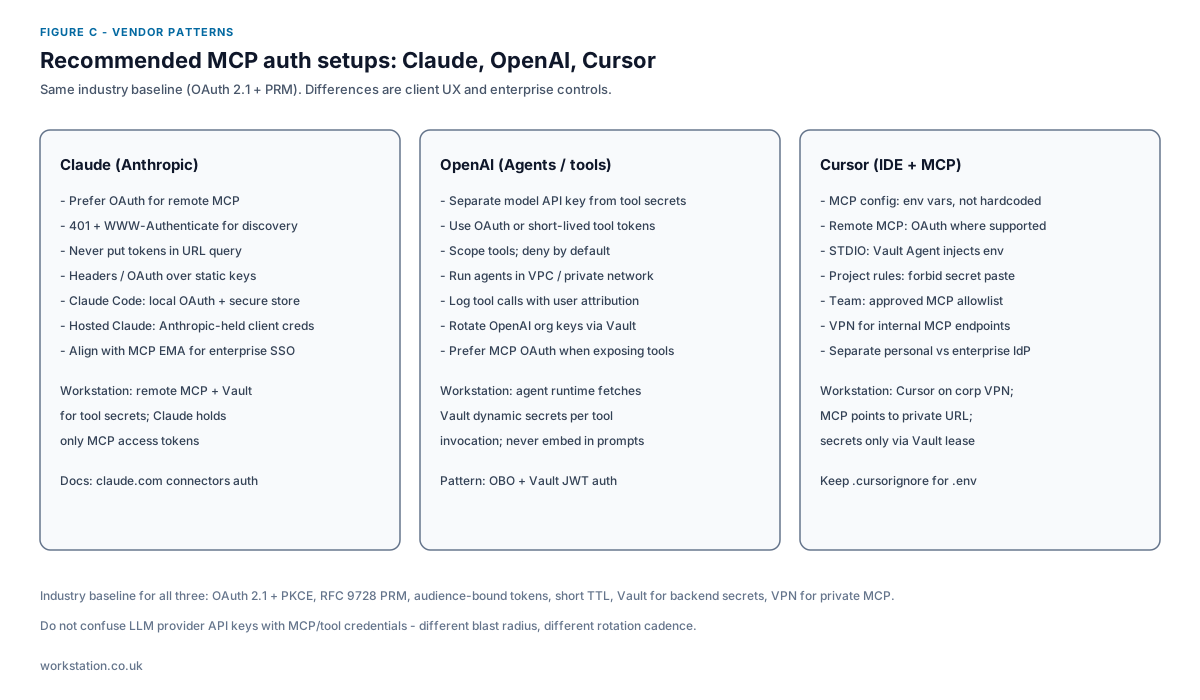
- Prefer OAuth for remote MCP connectors; return 401 with
WWW-Authenticatepointing at PRM so clients can discover auth. - Never put tokens/API keys in connector URL query strings (logged, cached, prohibited by MCP token rules).
- Claude Code: local OAuth with secure token store and refresh; plugins must not read tokens.
- Hosted Claude: Anthropic-managed client credentials for consenting users; still keep tool secrets in Vault behind your MCP.
- Enterprise: align IdP with MCP EMA for zero-touch server access.
5.2 OpenAI (Agents / tools)
- Separate model API keys from tool credentials; different rotation and blast radius.
- Run agent runtimes in VPC; call private MCP over private networking.
- Pass user-attributed tokens into tools; authenticate to Vault with JWT; mint dynamic secrets per invocation.
- Log every tool call with user + agent + lease_id for compliance.
5.3 Cursor
- MCP server config: reference environment variables only — never hardcode secrets in
mcp.json. - STDIO servers: run under Vault Agent (template or env) so leases rotate without developers copying passwords.
- Remote MCP: OAuth when the server supports it; otherwise corp VPN + short-lived bearer from Vault.
- Team policy: allowlist approved MCP servers; block untrusted community MCPs on prod codebases.
- Keep
.env/ secret files out of context via ignore rules; project rules: forbid pasting secrets into chat.
6. Reference control matrix
| Layer | Control | Anti-pattern |
|---|---|---|
| Identity | SSO IdP + EMA / OAuth PKCE | Shared robot password |
| MCP | PRM + audience-bound tokens | Tokens in URL; no expiry |
| Network | VPN / PrivateLink + egress ACL | Public MCP for prod tools |
| Secrets | Vault lease + rotate + revoke | Year-long keys in mcp.json |
| Ops | Audit IdP+MCP+Vault; human gates | Ungated prod deploys / payments |
7. Implementation checklist
- Inventory every MCP server and classify public vs private.
- Implement OAuth 2.1 + PRM on all remote MCP; enable EMA with corporate IdP.
- Move MCP + Vault behind VPN/private networking; document how Cursor/Claude join the network.
- Replace static tool keys with Vault dynamic secrets; set TTLs by risk class.
- Wire Vault Agent (or SDK renew/revoke) into agent runtimes; revoke leases on session end.
- Separate LLM provider keys; store and rotate them in Vault — never in prompts or MCP config.
- Add human approval gates for money, identity changes, and production deploys.
- Test: expired lease fails closed; wrong-audience token rejected; public path blocked.
Published by Workstation — enterprise automation, multi-agent platforms, and secure delivery on Kubernetes.