Can an AI System Process and File a Self Assessment Tax Return to HMRC Automatically?
Demonstrating FileMyTax — an AI-powered pipeline from bank PDFs to HMRC MTD filing, built by Workstation for CognoAI
 Balinder Walia20. Mai 20265 min read
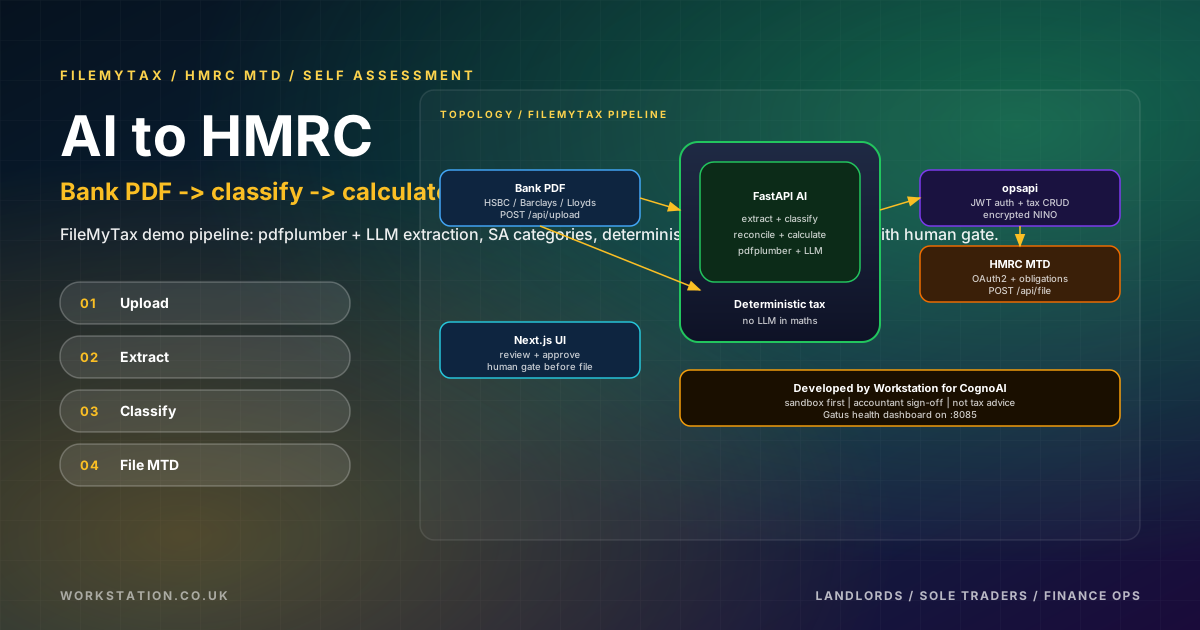
A short, skim-readable companion. For the full deep dive with architecture, HMRC OAuth, curl examples, and limitations, read the long article. Not tax advice.
Can AI file your Self Assessment to HMRC?
Every January the same question appears: can an AI read my bank statements and submit my UK tax return? The practical answer from a system we built for CognoAI — published here as FileMyTax — is yes for preparation, not for unattended filing. AI can extract transactions from PDFs, classify them into HMRC Self Assessment categories, reconcile balances, and compute 2025-26 tax deterministically; a human still reviews, an accountant still signs off, and the taxpayer still completes HMRC OAuth before anything reaches production MTD.
Workstation developed the underlying platform; CognoAI owns the intellectual property. This post explains what that looks like in six API calls — without using product names owned elsewhere.
Watch the demo
Bank PDF through classification and calculation to HMRC MTD sandbox — with review gates in the UI.
The six-step pipeline
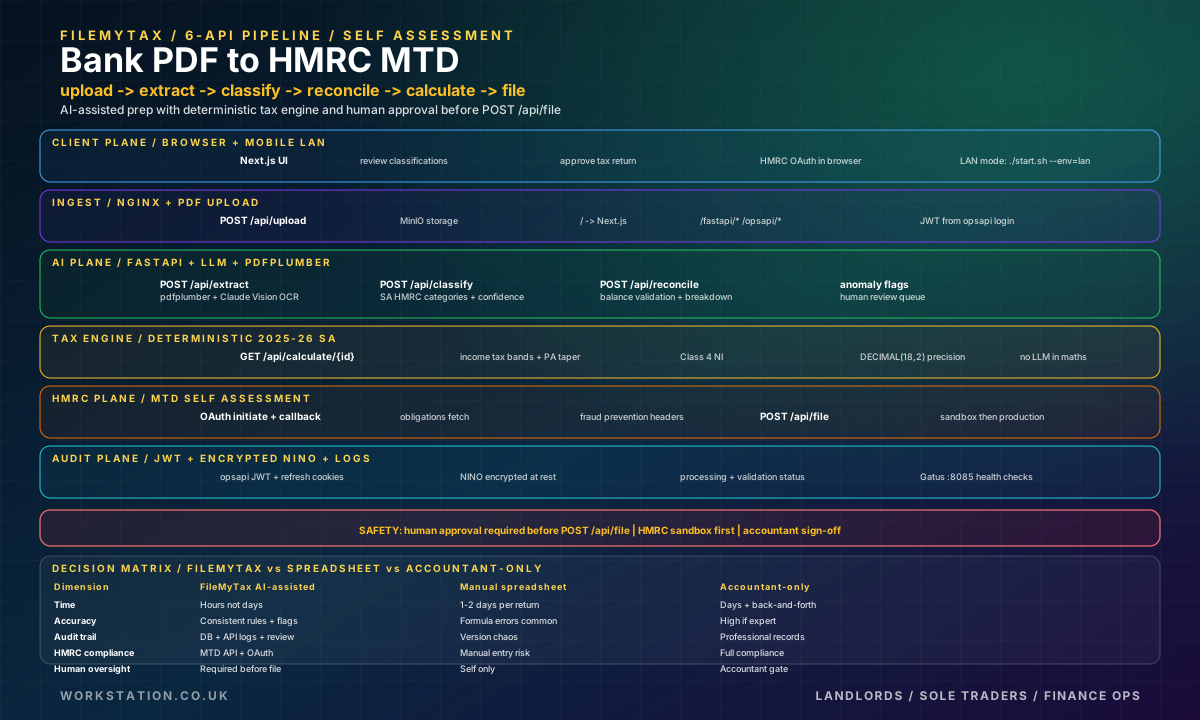
- Upload —
POST /fastapi/api/uploadsends the PDF to MinIO via nginx. - Extract — pdfplumber for native tables; Claude Vision for scans.
- Classify — LLM maps lines to SA expense categories with confidence scores.
- Reconcile — balance checks and income/expense roll-ups.
- Calculate — deterministic 2025-26 income tax + Class 4 NI (no LLM in maths).
- File —
POST /fastapi/api/fileto HMRC MTD after OAuth and human approval.
JWT auth comes from opsapi; NINO is encrypted at rest; Gatus on port 8085 watches every service.
Who built it
CognoAI owns the system IP and product direction. Workstation built the Dockerised platform — nginx path routing, FastAPI AI services, opsapi auth, PostgreSQL, MinIO, Gatus monitoring, and the Next.js review UI. We publish under the name FileMyTax to describe the demo; we do not use other CognoAI product names in this write-up.
Why AI helps — and where it stops
AI wins on speed and consistency across hundreds of bank lines, anomaly flagging, and mapping messy descriptions to HMRC categories. It does not replace judgement: transfers vs rent, capital vs revenue, and personal vs business still need eyes. The tax engine is pure Python with DECIMAL fields — the same separation we insist on for regulated finance: LLM for language, code for law.
In testing we used fictional HSBC-style landlord statement fixtures (synthetic data only) with high turnover scenarios to stress extraction — including lessons where pdfplumber picked the wrong column (balance vs paid-in). Those failures are why reconciliation and review exist.
Architecture at a glance
One nginx on localhost fronts everything: Next.js for humans, FastAPI for AI and filing, opsapi for login and encrypted NINO. PostgreSQL stores statements and classified transactions; MinIO holds PDFs. The tax calculator applies UK 2025/26 bands in Python — personal allowance taper, income tax, Class 4 NI — with DECIMAL(18,2) money fields. That split is intentional: regulators and accountants need reproducible maths, not probabilistic tokens.
Benefits for finance teams
- Speed — hundreds of lines classified in minutes, not days in Excel.
- Consistency — same HMRC category rules on every row.
- Anomalies — reconciliation surfaces balance and mapping errors early.
- Audit trail — processing status, confidence, overrides with reasons.
- Privacy — local stack option without passing statements through a SaaS tenant.
- Accountant time — reviewers see a draft return, not raw PDFs.
HMRC MTD in one paragraph
Save NINO via opsapi, initiate OAuth, fetch businesses and obligations, then file in sandbox until your accountant is happy. Fraud prevention headers and token refresh are handled server-side. Flip HMRC_ENVIRONMENT=production only when you mean it.
Disclaimers
- Not tax advice. Get a UK accountant to review before live submission.
- FileMyTax is the demonstration name in this article; other CognoAI product names are separate — do not conflate them.
- Fictional bank data where test fixtures are mentioned.
- No unattended filing — human gate before
POST /api/file.
What you will see in the video
The YouTube walkthrough shows the Next.js UI: upload a statement, watch extraction and classification progress, inspect confidence scores, run calculate for tax year 2025-26, connect HMRC in sandbox, and pause at the file step until a human confirms. That pause is the product decision — not a missing feature. Fully unattended submission would be faster and legally fragile.
Landlords with multiple rental accounts and sole traders with mixed personal and business lines are the primary audience. Finance ops teams supporting them get the same pipeline: fewer CSV exports, fewer all-nighters before 31 January, more time explaining numbers instead of finding them.
Try it safely
Clone the stack, run ./start.sh, paste the curl examples from the long article, and stay in HMRC sandbox until your accountant has walked through a full return. Set HMRC_ENVIRONMENT=sandbox, create a test user if needed, and treat POST /api/file like a production missile — because in live mode, it is.
If nginx port 80 is busy, use NGINX_HOST_PORT=8080. If JWT suddenly fails, verify opsapi and FastAPI share the same secret. If reconciliation shouts, fix PDF column mapping before overriding classifications — that order saves hours.
OAuth is not optional
HMRC will not accept a filing from a background cron job with only a National Insurance number. The taxpayer must authorise your application through Government Gateway, which returns tokens the backend stores and refreshes. FileMyTax surfaces that flow in settings: save an encrypted NINO, open the HMRC authorisation URL, return via callback, fetch businesses and obligations, then file. Fraud prevention headers ride along on every API call — device ID, user agent, and the rest of the Gov-* set the platform forwards from the client.
That is why "automatic" in marketing slides really means automatic preparation with a deliberate human and OAuth gate at the end. The engineering is still valuable: the six curl steps are repeatable, testable in sandbox, and observable in Gatus.
Read the long version
The long article covers attribution, architecture SVG, full curl examples, the benefits table, OAuth steps, limitations, Gatus monitoring, 2025-26 tax parameters, and roadmap. Watch the YouTube demo and visit cognoai.uk for product context; Workstation for engineering.
Auf Ihrem eigenen Rechner ausführen
Rechner, die KI für Steuererklärungen lokal ausführen
Kontoauszüge gehören zu den sensibelsten Daten, die Sie besitzen. Ein lokales LLM kann jede Transaktion extrahieren und in die Einnahmen- und Ausgabenkategorien der HMRC Self Assessment einordnen, ohne dass die Auszüge Ihr Büro verlassen. Jeder der folgenden Rechner führt die Schritte Extrahieren, Klassifizieren und Abgleichen aus diesem Beitrag aus. Die Schaltfläche legt ihn mit hinzugefügter Trade-Mitgliedschaft in Ihren Warenkorb und öffnet die Kasse – Sie können Trade dort vor dem Bezahlen entfernen.
- NVIDIA
NVIDIA DGX Spark
GB10 Grace Blackwell mit 128 GB Unified Memory. Betreibt Klassifikatoren der 70B-Klasse und ein Vision-Modell für gescannte Auszüge nebeneinander – ausgelegt für eine Kanzlei, die für viele Mandanten Erklärungen einreicht.
Mit Trade in den Warenkorb - Apple
Apple Mac Studio — M5 Max, 36 GB
Ein leiser Desktop für Selbstständige oder kleine Kanzleien. 8B–14B-Modelle in Ollama oder MLX klassifizieren die Transaktionen eines ganzen Steuerjahres und markieren alles, bei dem sie unsicher sind, zur Prüfung.
Mit Trade in den Warenkorb - AMD Ryzen
Workstation Creator AI — AMD Ryzen 9 9950X + RTX 5090
Ein Tower mit 16-Kern-AMD-Ryzen und einer GPU mit 32 GB, ausgeliefert mit installiertem Ubuntu und CUDA-Stack. Schnelle Batch-OCR und Klassifizierung, wenn Sie Auszüge in großen Mengen verarbeiten.
Mit Trade in den Warenkorb